Set the rules once. Then stop chasing them.
A text when the job books. A task raised when the survey comes back. The status moved on when the payment lands. You build the rules on a canvas, and Onroute runs them on every job that matches — with a log on the job of what fired and when.
Something happens on the job. A workflow starts.
Workflows start from what the job does, not from someone remembering. A booking, a status change, a module finished, a payment in, a form back — or a time you pick. More than twenty triggers, chosen on a canvas you can read at a glance.
Features
- A job is booked, changes status or completes
- A job misses its booking deadline
- A compliance module is completed on the job
- A payment lands, or a form is submitted
- Time-based triggers, so a rule can fire on a schedule
- Rules for the simple cases, the canvas for the rest
What it does once a workflow fires.
Every rule ends in an action, and one rule can carry several. Send the text or email from your own template. Raise a task, move the status on, assign an engineer, share the job with a partner, or push it out to another system.
Features
- Send a text or an email from one of your templates
- Raise a task, with a name and a date on it
- Change the job status, or assign an engineer
- Share the job with a partner firm
- Send a webhook to your other systems
- Notify the people who need to know
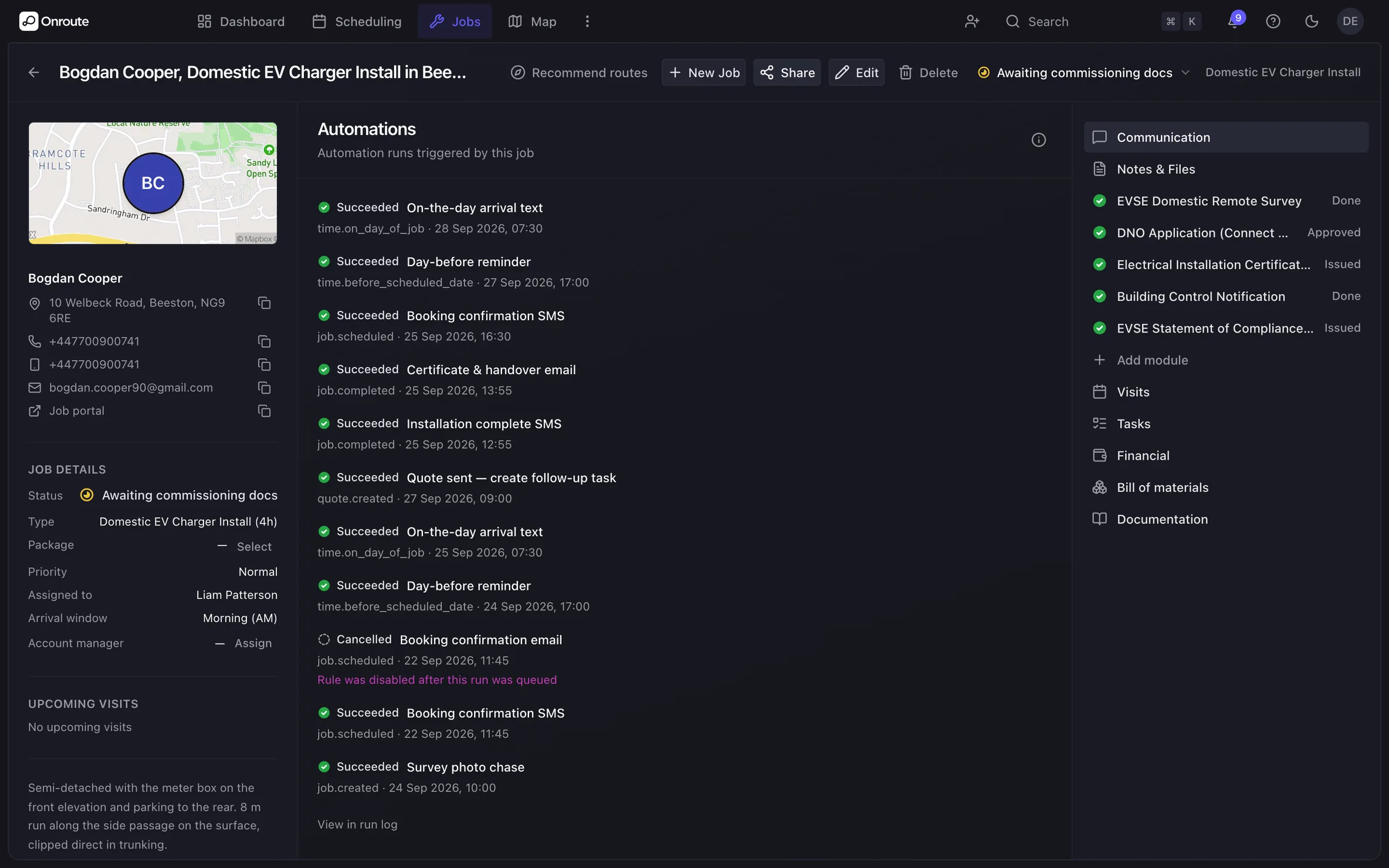
Every run on the record. Open the job and see it.
The runs log sits on the job: which rule fired, what it did, and when. Rules can vary by job type or by key account, so a warranty call is not handled like a new install. And you need not start from nothing — import a blueprint, a ready-made set of rules, and edit it.
Features
- A runs log on the job: what fired, and when
- Variations per job type or key account
- Blueprints — ready-made rule sets you import
- Import a rule set rather than building it twice
- Custom statuses and job types drive the rules
Messages that write themselves.
Your organisation gets its own UK mobile number, so texts come from you. Templates fill in the name, the date and the engineer from the job. Replies land back on the job, next to the photos and the paperwork.
Features
- Templates with merge fields — name, date, engineer
- Your own UK mobile number for the organisation
- Replies land on the job, not in someone’s inbox
- Bulk text up to 200 ticked jobs at once
- Calls logged on the job with the messages
- WhatsApp and RCS on the wayComing soon
Webhooks and the API. Onroute talks to the rest of your stack.
Point a webhook at your own system and pick the events you want from the catalogue. Every delivery is logged, and you can resend one that failed. There is a public API with keys for onboarding and read access, and the integrations that come with it: Xero, WhatConverts and Twilio.
Features
- Webhook endpoints with a catalogue of event types
- A delivery log, and resend on any delivery
- Public API and API keys for onboarding and read access
- Xero sync for your invoices
- WhatConverts leads straight into Onroute
- Twilio numbers provisioned for you
Stop doing what a rule could do
Bring the chase-ups you run by hand and see them built.